
Visual Content SEO: How to Make Images Work for Search

How SEO and Visual Content Work Together to Grow Organic Traffic
A lot of people don’t realize that search engines pay attention to more than your text. Your photos, charts, and videos get looked at too. When they’re not set up properly, your page can load slower, and your visuals can end up ignored in search results.
The fix isn’t complicated, though. Visual content SEO simply means helping search engines find your visuals, understand them, and show them in results. It has two parts. Image SEO deals with your photos and graphics, while visual search optimization helps your images show up when people search using their phone camera.
Let’s start with what visual content SEO actually is, and why it’s a bigger deal now than a few years ago.
What Is Visual Content SEO?
In plain terms, visual content SEO means getting your images, graphics, and videos ready so search engines can find and rank them. That comes down to things like file names, alt text, image size, and how fast your page loads.
Let’s say you have a bakery website, and you post a photo of a chocolate cake. If you upload it as “IMG_4021.jpg” with no description, Google can’t tell what’s in it. But if you name it “chocolate-layer-cake.jpg” and write some clear alt text, Google gets it right away.
People search with pictures more than ever. Think with Google reports that Google Lens processes more than 20 billion visual searches a month. About one in four of those has commercial intent, meaning the person may be looking to buy.
Imagine someone sees a nice lamp at a friend’s house and takes a photo of it. If you sell that kind of lamp, your product photo could be the first thing they find. For online sellers, that’s a big reason to care about visual search optimization.
The Visuals That Count
Almost any visual on your site can help your SEO. The main ones are:
- Photos, such as product shots or pictures of your team
- Charts, graphs, and infographics
- Screenshots and step-by-step visuals
- Videos and video thumbnails
How Image SEO Works
Image SEO is the piece of SEO that helps search engines figure out what’s in your photos and graphics. To do it well, you need to know what they pay attention to.
The Words Around Your Images
Search engines read text really well. So they lean on the words near your visuals to understand them. That includes the file name, alt text, caption, and the paragraph around the image.
Say you put a photo of running shoes under a heading about trail running. Google will likely figure those shoes are meant for trails. The text is what gives the picture its meaning.
Visual Search Optimization Starts With the Image
Google Lens and tools like it can also look at the image itself. They pick up objects, colors, and even words printed in the photo. So visual search optimization really starts with the photo you pick.
These tools have an easier time with images that are sharp, well lit, and not cluttered. A fuzzy shot with five products crammed in is a lot harder to match. For product images, shoot one item at a time on a plain background, then add a few photos of it in use.
Speed and Page Experience
Your images also affect how fast your page loads, and speed is one of the things Google checks when it judges page experience. One huge image file can drag the whole page down, even if everything else is quick. We’ll cover how to fix that below.
How to Optimize Your Visual Content for SEO
Now for the hands-on part. These tips work whether you run a blog, an online store, or a service business site.
Start With Original Visuals
Stock photos are easy to use, but they’re everywhere. When the same photo is on 500 other websites, it won’t do much to set your brand apart.
Original visuals give other sites a reason to link to you. Think of a chart based on your own survey, or a simple infographic that walks through a process. Other bloggers love referencing that kind of thing. And those links help your whole site rank better.
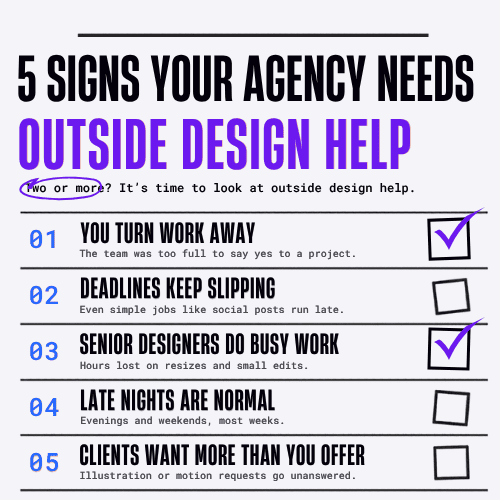
You don’t need a big team to make them. Some businesses get by with free design tools. Others hire freelancers or use graphic design services to keep a steady flow of charts, illustrations, and custom graphics. Go with whatever fits your budget and how often you post.
Give Your Files Clear Names
Rename your image before you upload it. Use a few simple words and put dashes between them, for example “blue-ceramic-coffee-mug.jpg.” A name like “DSC_0012.jpg” tells Google nothing, so change it. You don’t need to add a bunch of keywords either. Just write what the picture shows. That’s enough.
Write Helpful Alt Text
Alt text is a short description of an image. Screen readers read it aloud for people who can’t see the picture. It’s also a big part of image SEO, since search engines use it to understand what the image shows.
Still, plenty of websites don’t bother with it. The WebAIM Million 2026 report checked the top one million home pages and found that 53.1% had at least one image missing alt text. If your competitors are skipping it, that’s an easy chance for you to get ahead.
Good vs. Bad Alt Text
Good alt text is just a plain description of the photo. Let’s say you’re selling a blue coffee mug. If you only write “mug,” that’s too vague to be useful. If you write “mug coffee mug best mug buy mug cheap mug,” that’s keyword stuffing, and Google won’t reward it. Something like “Blue ceramic coffee mug on a wooden table” works much better, since it describes what a person would actually see.
Most of the time, 125 characters or less is plenty. If an image is only decorative, like a divider line between sections, you can leave its alt text blank.
Add Captions and Context
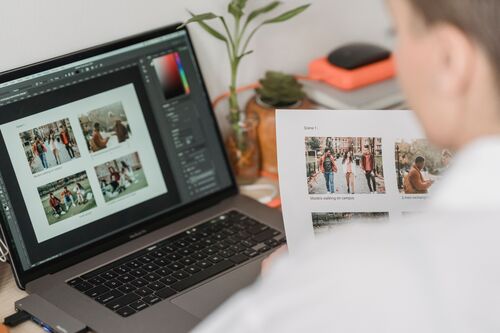
A lot of readers skim, but they still look at captions. So a short caption under your chart or photo gets noticed by people, and it gives search engines more context too.
Put your images near the text they relate to. If you made a chart about holiday sales, it should sit in the holiday sales part of your post. Don’t leave it at the very bottom.
Choose the Right Size and Format

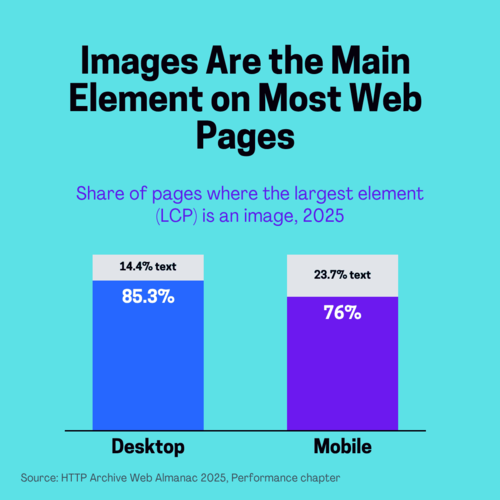
Good image SEO also means images that load fast. The HTTP Archive Web Almanac 2025 found that an image was the largest element on 76% of mobile pages. It also found that only 62% of mobile pages had a good Largest Contentful Paint score, which measures how fast the main content shows up.
To keep pages quick, resize images to the size they’ll actually appear. A blog image shown at 800 pixels wide doesn’t need to be 4,000 pixels wide. Then compress your images and use modern formats like WebP when you can. The same report found JPG is still used for 57% of main page images, while WebP is at only 11%.
One more tip: don’t lazy load the main image at the top of your page. Lazy loading is great for images further down. But about 16% to 17% of pages lazy load their main image, which makes it show up later.
Set Image Width and Height
You’ve probably had this happen. You start reading an article, then an image loads and the whole text jumps down the page. That’s called layout shift, and it’s really annoying for readers.
The fix is to set a width and height for every image in your code. Most website builders handle this for you. Still, the Web Almanac found that 62% of mobile pages left out the size on at least one image.
Help Google Find Your Images
Before Google can rank an image, it has to know the image exists. So use normal HTML image tags, and don’t rely only on CSS backgrounds to load your pictures. If your site has a lot of pages, adding an image sitemap gives Google a better shot at finding images it would’ve missed.
On product pages, structured data (schema markup) can show details like price and stock status right in search results. It helps visual search optimization too, since shoppers who find a product through Lens usually want that info right away.
Make Your Charts and Infographics Easy to Share
Original charts can earn backlinks, but only if people find them easy to use. Under each chart, add a short text summary of the main takeaway. That way, search engines and AI tools can understand your data better too.
Put a source line on every chart. Some sites also offer a simple embed code, so other bloggers can share the graphic with a link back to you.
Final Thoughts
Many small business owners skip image SEO because they think it’s too technical. It really isn’t. Renaming a file or adding a line of alt text only takes a few seconds, and after doing it a few times, it just becomes part of how you upload images.
Doing these things will help your pages load faster and rank better. More people are also searching with their cameras now, so good visual search optimization gives your photos and products a better chance of showing up in Google Lens.
A good place to start is your top five pages. Go through the images on each one this week and fix the simple stuff first.